Nothing to install · On your phone and computer · Export your files and use them outside Oryx
4 channels
CH1CH2CH3CH4
CH1CH2CH3CH4
Each project is either digital or analog, with all its channels on the same timeline.
Import an existing signal
Edit without starting from scratch
Export to standard formats
Up to 16 channels
Unlimited length on Plus and Pro
Optional ESP32 for hardware tests
Import an existing signal
Edit without starting from scratch
Export to standard formats
Up to 16 channels
Unlimited length on Plus and Pro
Optional ESP32 for hardware tests
Oryx Signal Studio is a platform to create, convert, edit and export signals quickly.
Import an oscilloscope image, photo or screenshot, or a CSV or TXT file, and turn it into an editable signal. Make the changes you need and export the result to TXT, CSV or JSON depending on your plan to use it in your own projects.
And when you need to test the result physically, you can connect it to an ESP32 and generate the signal while you edit it.
Import
Edit
Export
ESP32
From an existing signal to a usable file, without rebuilding everything from scratch.
Building a signal by hand can mean spending hours reconstructing pulses, timings and levels from an image, photo or screenshot, or existing data.
Oryx cuts that work.
Take the information you already have, turn it into an editable signal and focus on tuning it and putting it to use.
Import
Start from an oscilloscope or logic analyzer image, photo or screenshot, or from a data file.
Edit
Fix levels, steps, channels, patterns and waveforms right in the editor.
Export
Get a file ready to drop into your firmware, script, test bench, documentation or any other project.
Import
Turn an image, photo or screenshot into an editable signal in seconds.
There's no need to rebuild by hand a signal that already exists.
Upload an image from your oscilloscope or logic analyzer, or import a data file, and Oryx turns that information into a signal you can edit in the editor.
Images
PNG, JPG, WebP and SVG.
Data
CSV and TXT with time and signal data.
Result
An editable signal ready to fix, trim, repeat, modify or export.
Your signal doesn't start from zero. It starts where your data already is.
Image, photo or screenshot
Editable signal
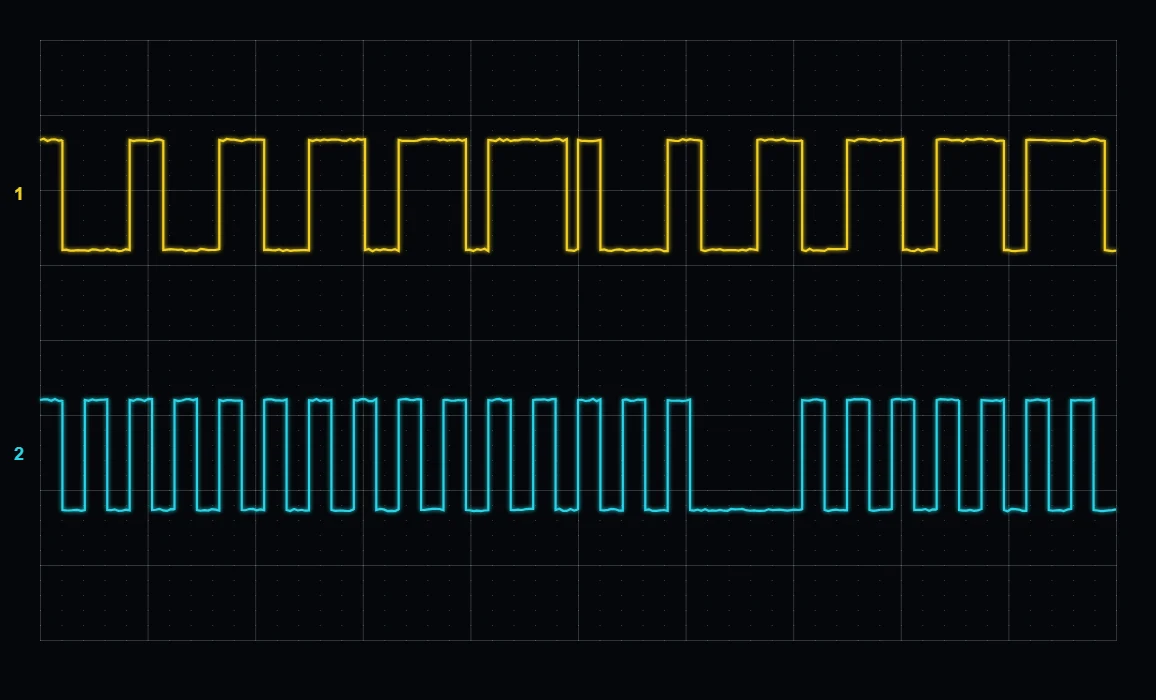
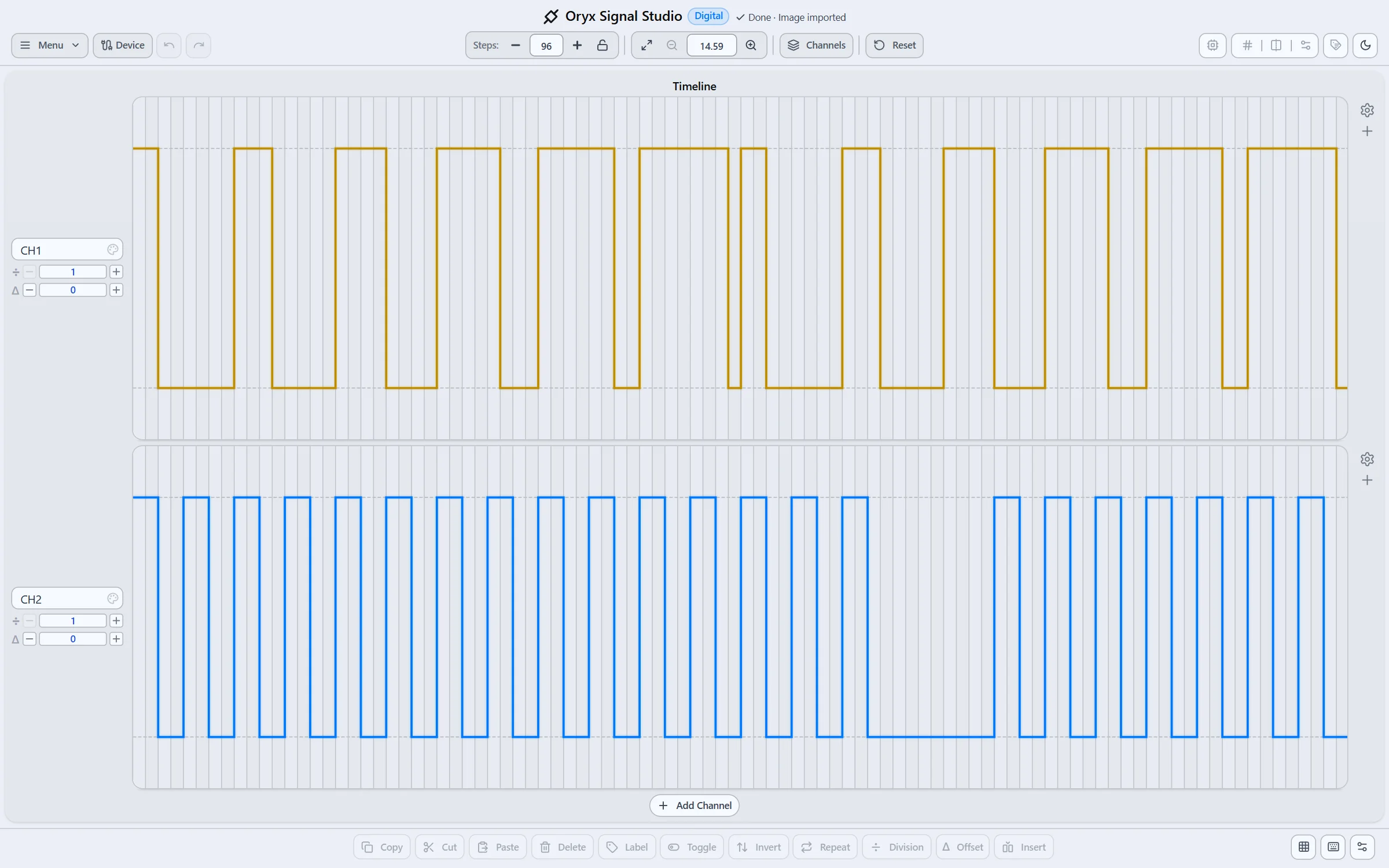
Example image, photo or screenshot and the signal produced when you import it.
Editor
Edit the signal exactly the way you need.
Oryx is built to make changing a signal fast.
Work right on the timeline, change channels and tweak patterns without writing code for every test.
Digital
Build signals step by step and use sub-steps to define patterns more precisely.
Analog
Create curves, ramps, peaks and plateaus with a simple visual editor.
Multichannel
Build synchronized signals with up to 16 channels.
Long signals
Work with unlimited-length signals on the Plus and Pro plans.
Design the signal. Not the code around it.
Toggle step
Select
Paste
Sub-steps
Export
Export your signal and take it to any project.
Once you've designed it, you don't need to stay inside Oryx.
Export the signal in well-known formats and use it wherever you need.
TXT
Simple, readable and easy to use from firmware or your own tools.
CSV
Ideal for analysis, data processing and spreadsheets.
JSON
Perfect for apps and tools that work with data structures.
PDF
Coming soon. The option is disabled in the editor.
Oryx creates the file. You decide where to use it.
You don't need an extra license to use an exported signal, or to keep your project connected to Oryx to keep working with it.
Your exported files are meant to leave the platform and become part of your own projects.
The same project in each format: one row per change and the generator settings at the end.
ESP32
Want to test the signal physically? Connect it to an ESP32.
Oryx doesn't need an ESP32 to work.
You can design, edit and export your signals entirely from the platform. But when you need to check them on hardware, you can send them straight to an ESP32 and use them as a real test signal.
USB
Connect the ESP32 straight to your computer and generate the signal from Oryx.
WiFi
Connect several generators on the same network and switch between them from the platform.
Real time
Change the signal and see the effect on the generator right away.
Speed
Set the speed in µs/step, RPM, bps or Hz to match playback to your test.
Design → generate → modify → test again.
The goal isn't to replace your development tools, but to shorten the time between a change and its test.
Connect device
Connection
ESP32 over USBWeb SerialConnected
The same cable you flash the firmware with: the browser asks you to pick the port and that is it.
Devices on the network 3Searching
Oryx-Signal-4C2A192.168.1.41Connected
Oryx-Signal-91B0192.168.1.42
Oryx-Signal-E57D192.168.1.47
Signal running Digital · 2 channels · 64 steps
Voltage
3.3 V
Speed (RPM)
1500 RPM
Stop signal
Over USB for a quick test, or over WiFi with several generators on the same network.
Less time rebuilding signals. More time testing.
When a test needs a specific signal, you usually have to create it, convert data, write code, upload it and change it again every time a condition changes.
Oryx brings that whole process into a single tool.
Design the signal, generate the file and, when you use an ESP32, watch the changes right on the hardware.
The same design can go from your screen to your hardware in minutes.
01Import or create
02Edit
03Export or generate
04Test
05Modify
06Repeat
Decode signals and protocols without losing sight of the waveform.
Beyond manual design, Oryx can help you understand what's happening inside a signal.
It decodes common protocols and shows the information right on the signal, so you can match the bits to the frame you're looking at.
UART
Analyze bits, bytes, settings and frames.
CAN
Identify frame fields and review their structure bit by bit.
I2C
See communication between devices and its different fields.
Modbus
Work with RTU, ASCII and TCP frames.
From the waveform to the protocol it carries.
UART 8N1CANI2CModbus
Analog signals without the hassle.
Creating an analog waveform shouldn't mean building hundreds of points by hand.
Oryx lets you draw curves visually and work with shapes such as ramps, peaks, edges and plateaus.
Adjust the shape, check the cycle and export the signal at 8, 10, 12 or 16 bits.
The same Oryx approach, also for analog signals.
Cloud
Your signals, saved and organized in the cloud.
Every project is saved to your account and opens on your computer or your phone, without relying on loose files on your machine.
Oryx includes a full file manager to keep your signals in order.
Folders
Organize your projects in folders and subfolders, move them around and share a whole folder with a link.
Collections
Export several signals at once in a single file, with their metadata.
History
Go back to an earlier version or recover what you deleted from the trash for 7 days.
Security
Your files are kept in private storage: only your account can open them, unless you share a link.
Your work, saved. Your files, yours alone.
Share a signal without sending separate files.
When someone else needs to review or use a signal, you can share it straight from Oryx.
Send a link and let them open the project in their browser.
Ideal for:
Engineering reviews
Collaboration between developers
Documentation
Classes and labs
Sharing test patterns
One signal. One link.
One tool for many kinds of tests.
01
Firmware development
Create specific patterns to test drivers, state machines, decoders and communication functions.
02
Test benches
Generate repeatable, controlled signals to test hardware and electronic systems.
03
Automotive testing
Design sensor signals and use RPM control to reproduce different conditions during tests.
04
Communication protocols
Build or review UART, CAN, I2C and Modbus signals and see how they relate to the frame.
05
Analysis and documentation
Turn existing images, photos or screenshots and data into editable, exportable signals for technical documentation.
06
Education
Use real signals and protocols to learn how data is built and transmitted at the bit level.
Design in Oryx. Use your files wherever you want.
Oryx is meant to complement your tools, not to lock you into them.
You can create your signals on the platform, export them and keep working with them in your own software, firmware, test bench or system.
Your project doesn't need to depend on Oryx forever to use a signal you've already exported.
Your signal shouldn't be trapped inside your design tool.
Choose how much you need for your projects.
Start with the essentials and grow your capacity as your signals and projects grow.
Plus$12.50 USD / monthor $120 USD / year $150 · save 20%For bigger projects and frequent use.Choose Plus
Pro$19.90 USD / monthor $190 USD / year $238.80 · save 20%For complete workflows.Choose Pro
Signal modes
Digital mode
Included
Included
Included
Analog mode
Included
Included
Included
Projects
Channels per project
4
8
16
Steps per project
3,000
Unlimited
Unlimited
Storage
1 MB
500 MB
1 GB
Templates
Not included
Included
Included
Version history
Not included
Not included
Included
Trash
Not included
Not included
Included
Share signals
Included
Included
Included
Import
Oscilloscope or logic analyzer images, photos or screenshotsPNG, JPG, WebP, SVG
10 per day
50 per day
Unlimited
Signal files time / voltageCSV, TXT
10 per day
50 per day
Unlimited
No limit for files created with OryxTXT, CSV, JSON
Not included
Not included
Included
Export
Formats
TXT, Protocol JSON
TXT, CSV, JSON, Protocol JSON
TXT, CSV, JSON, Protocol JSON
Analog resolution
8 bits
12 bits
16 bits
Export with metadata
Not included
Included
Included
Custom metadata
Not included
Not included
Included
Files without the Oryx credit
Not included
Included
Included
Protocols
UART
Included
Included
Included
CAN
Not included
Included
Included
I2C
Included
Included
Included
Modbus
Not included
Included
Included
ESP32 Generator
USB connection
Included
Included
Included
WiFi connection (Multi-device)
Not included
Not included
Included
Signal transmission and reception with response validation
Included
Included
Included
Exported files are meant to be used outside Oryx. You don't need to pay a license for each use of an exported signal.
All prices are in US dollars (USD) and payments are processed by Stripe. More details in the pricing docs.
Oryx is built for one specific job.
Oryx is
A digital and analog signal editor.
A tool to turn images, photos or screenshots and data into editable signals.
A signal file generator.
A support tool for hardware and firmware testing.
An interface to generate signals with an ESP32.
Oryx is not
An oscilloscope.
A physical logic analyzer.
A circuit simulator.
A replacement for your firmware.
A platform that forces you to use proprietary hardware.
You decide where Oryx ends and your project begins.
Frequently asked questions
Do I need an ESP32 to use Oryx?
No. You can create, import, edit, share and export signals without connecting any hardware. The ESP32 is an option to generate the signals physically and speed up testing.
Can I import an oscilloscope image, photo or screenshot?
Yes. You can import supported images or data files and turn them into an editable signal in Oryx.
Which formats can I export?
You can export signals to TXT; CSV and JSON are available on Plus and Pro. PDF is coming soon.
Do my signals depend on Oryx after I export them?
You don't need to keep them in Oryx to use them. Once exported, you can work with the files from your own tools and projects.
How many channels can I use?
Depending on your plan, you can work with up to 4, 8 or 16 channels.
Can signals be unlimited in length?
The Plus and Pro plans allow unlimited-length signals, within each account's storage capacity.
Does Oryx work for automotive signals?
Yes. You can use it to create or play back signal patterns used during testing, including sensor-related signals and RPM control.
Can I use Oryx to study protocols?
Yes. Oryx includes UART, CAN, I2C and Modbus decoding.
Does it work on mobile?
Yes. On your phone you create signals with the generators (UART, I2C, SPI, PWM, waves, equations and more) and watch them take shape as you type; you also open your projects, play, import and export. To draw by hand on the timeline, continue on your computer: the signal is waiting there, right where you left it.
Start with a signal. Finish with a file ready to use.
Import what you already have, create what you need, edit it quickly and take it straight to your project.
And when you need to test it on hardware, connect an ESP32 and check the result in real time.